APEP API Reference
lTrim
- This function removes leading whitespace characters (spaces, tabs, etc.) from a string.
Parameters
str(string): The input string to be trimmed.
Returns string
- The input string with leading whitespace removed.
Example:
- Removes leading whitespace characters.
rTrim
- This function removes trailing whitespace characters (spaces, tabs, etc.) from a string.
Parameters
str(string): The input string to be trimmed.
Returns string
- The input string with trailing whitespace removed.
Example:
- Removes trailing whitespace characters.
Trim
- This function removes both leading and trailing whitespace characters (spaces, tabs, etc.) from a string.
Parameters
str(string): The input string to be trimmed.
Returns string
- The input string with leading and trailing whitespace removed.
Example:
- Removes leading and trailing whitespace characters.
print
- This function prints the specified arguments to the console with colorful output.
Parameters
...(any): The arguments to print.
Example:
- Prints the provided arguments with colorful output.
RandomNumber
- This function generates a random number within the specified range.
Parameters
min(number): The minimum value of the random number range.max(number): The maximum value of the random number range.
Returns number
- A random number within the specified range.
Example:
- Generates a random number between 1 and 100.
RandomString
- This function generates a random string of the specified length, containing both lowercase letters and digits.
Parameters
length(number): The length of the random string to generate.
Returns string
- A random string of the specified length, containing a mix of lowercase letters and digits.
Example:
- Generates a random string of length 10.
ApepMod
- This function calculates the remainder of the division of two numbers using the Mod algorithm. The algorithm ensures that the result is always positive and between 0 and b. It calculates the remainder by subtracting the floor division of a by b multiplied by b from a.
Parameters
a(number): The dividend for which the remainder is calculated.b(number): The divisor.
Returns
remainder(number): The remainder of the division.
Example:
TableMerge
- This function merges the contents of two tables. If a key in both tables corresponds to a table value, the function recursively merges those nested tables.
Parameters
t1(table): The first table to merge.t2(table): The second table to merge.
Returns table
- A table containing the merged contents of the two input tables.
Example:
local table1 = { a = 1, b = { x = 2, y = 3 } }
local table2 = { b = { y = 4, z = 5 }, c = 6 }
local mergedTable = _A.TableMerge(table1, table2) -- (1)!
- Merges the contents of the two tables.
StrExplode
- This function takes a string and a delimiter character, and returns a table of substrings obtained by splitting the input string at occurrences of the delimiter.
Parameters
str(string): The input string to be exploded.
Returns ...
- Multiple return values representing the substrings obtained after splitting.
Example:
- Splits the input string into substrings.
BagSpace
- This function calculates the total number of free slots available across all bags.
Returns number
- The total number of free slots available across all bags.
Example:
-- Get the total number of free slots across all bags
local freeSlots = _A.BagSpace()
print("Total free slots:", freeSlots)
SlotAlias
| SlotAlias | InventorySlotName | SlotNumber |
|---|---|---|
head or helm |
HeadSlot | 1 |
neck |
NeckSlot | 2 |
shoulder |
ShoulderSlot | 3 |
shirt |
ShirtSlot | 4 |
chest |
ChestSlot | 5 |
belt or waist |
WaistSlot | 6 |
legs or pants |
LegsSlot | 7 |
feet or boots |
FeetSlot | 8 |
wrist or bracers |
WristSlot | 9 |
gloves or hands |
HandsSlot | 10 |
finger1 |
Finger0Slot | 11 |
finger2 |
Finger1Slot | 12 |
trinket1 |
Trinket0Slot | 13 |
trinket2 |
Trinket1Slot | 14 |
back or cloak |
BackSlot | 15 |
mainhand or weapon or weapon1 |
MainHandSlot | 16 |
offhand or weapon2 |
SecondaryHandSlot | 17 |
ranged |
RangedSlot | 18 |
tabard |
TabardSlot | 19 |
ItemEquip
- This function equips an item in the specified slot.
Parameters
NameOrID(string/number): The item name/ID.NameOrSlot(string/number): The slot name/number.
Returns nil
Example:
-- Equip an item named "Sickle Axe" to the main hand slot
_A.ItemEquip("Sickle Axe", "MainHand")
-- Equip an item with ID 1602 to the SlotNumber 16 (Main Hand)
_A.ItemEquip(1602, 16)
ItemUnequip
- This function unequips an item from a specified slot and places it in the backpack.
Parameters
NameOrSlot(string/number): The slot name/number.
Returns number
Id(number): The ID of the unequipped item, or -1 if no item was found in the slot.
Example:
-- Unequip the Main Hand weapon
_A.ItemUnequip("MainHand")
-- Unequip the slot 16, where 16 is the SlotNumber for Main Hand
_A.ItemUnequip(16)
GetObjectCount
- This function returns the total number of objects currently present in the object manager.
Returns
count(number): The number of objects in the object manager.
!> DEPRECATED
Example:
- Retrieves the total number of objects in the object manager.
GetObjectWithIndex
- This function takes an index as input and returns the pointer of the object with that index in the object manager.
Parameters
index(number): The index of the object to retrieve the pointer for.
Returns
pointer(string): The pointer of the object with the specified index.
!> DEPRECATED
Example:
local objectCount = _A.GetObjectCount() -- (1)!

for i=1, objectCount do -- (2)!
  print(_A.GetObjectWithIndex(i))
end
- Retrieves the total number of objects in the object manager.
- Iterate through each object index and print its pointer.
ObjectPointer
Parameters
object(string): The object.
Returns string or nil
- The pointer as a
hexadecimal stringprefixed by 0x, ornilif the object does not exist.
!>Note: If the object doesn't exist, for example, ObjectPointer("party1target"), it returns nil. This API is mainly useful to get the object address of unitIDs like "target", "mouseover", etc. ObjectPointer("0xDEADBEEF") simply returns "0xDEADBEEF" and does NOT check if the address exists in the object manager. Avoid using this for arbitrary addresses.
Example:
ObjectExists
- Get whether an object exists in the object manager with O(n) performance.
Parameters
object(string): The object.
Returns bool
trueif object exists in the object manager,falseotherwise.
Example:
ObjectIsVisible
- Get whether an object is visible in the object manager with O(1) performance.
Parameters
object(string): The object.
Returns bool
trueif object is visible,falseotherwise.
Example:
ObjectPosition
- Get an object's position.
Parameters
object(string): The object.
Returns number, number, number
- The x, y, and z coordinates
!>Note: If the object doesn't exist, it returns (nil, nil, nil)
Example:
ObjectFacing
- Get an object's facing.
Parameters
object(string): The object.
Returns number
- The facing (angle in xy) in radians
!>Note: If the object doesn't exist, it returns nil.
Example:
ObjectCreator
- This function retrieves the GUID of the creator who created the specified fishing bobber object.
Parameters
object(string): The pointer of the object for which to retrieve the creator's pointer.
Return string
- The pointer of the unit who created the object, or nil if the object or its creator's pointer is not available.
Example:
- Retrieves the pointer of the creator of the specified object.
BobberCreator
- This function retrieves the GUID of the creator of the fishing bobber object.
Parameters
object(string): The pointer of the fishing bobber object for which to retrieve the creator's GUID.
Returns string
- The GUID of the creator who created the fishing bobber object, or nil if the object is not a valid.
Example:
- Retrieves the GUID of the creator of the fishing bobber.
BobberIsAnimating
- This function checks whether the specified fishing bobber object is currently animating, indicating that it has caught a fish.
Parameters
object(string): The fishing bobber object to check for animation.
Returns bool
trueif the fishing bobber object is animating, indicating it has caught a fish,falseotherwise.
Example:
- Checks if the specified fishing bobber object is animating.
UnitTarget
- This function takes a unit object and returns the target of that unit as its pointer and GUID.
Parameters
object(string): The unit object for which to retrieve the target.
Returns pointer, guid
pointer(string): The pointer of the unit's target.guid(string): The GUID of the unit's target.
Example:
- Retrieves the target of the 'mouseover'.
UnitCastID
- This function takes a unit object as a parameter and returns information about the unit's current cast, including its cast ID, pointer, and GUID.
Parameters
object(string): The unit object for which to retrieve the cast information.
Returns castId, pointer, guid
castId(number): The cast ID of the unit's current cast.pointer(string): The pointer of the unit's cast.guid(string): The GUID of the unit's cast.
Example:
local castId, tarPointer, tarGUID = _A.UnitCastID("target") -- (1)!
if castId==12345 then
    -- (2)!
end
- Retrieves the cast information of the 'target' unit.
- Do something
UnitIsFacing
- This function checks whether the first unit is facing the second unit within the specified angle range.
Parameters
object1(string): The pointer or unitId of the first unit.object2(string): The pointer or unitId of the second unit.angle(number): [optional] The angle range (in degrees) within which the first unit is considered to be facing the second unit. Default is 180 degrees.
Returns
isFacing(bool):trueif the first unit is facing the second unit within the specified angle range,falseotherwise.
Example:
local angleThreshold = 90
local isFacingTarget = _A.UnitIsFacing("player", "target", angleThreshold) -- (1)!
- Checks if the player is facing the target within a 90-degree angle.
PositionIsFacingPosition
- This function checks whether a position (defined by coordinates and facing angle) is facing another position within the specified angle range.
Parameters
oX(number): The X-coordinate of the position from which the facing angle originates.oY(number): The Y-coordinate of the position from which the facing angle originates.dX(number): The X-coordinate of the position to which the facing angle is directed.dY(number): The Y-coordinate of the position to which the facing angle is directed.oFacing(number): The facing angle (in radians) of the origin position.angle(number): [optional] The angle range (in degrees) within which the origin position is considered to be facing the target position. Default is 180 degrees.
Returns
isFacing(bool):trueif the origin position is facing the target position within the specified angle range,falseotherwise.
Example:
local playerX, playerY = _A.ObjectPosition("player")
local playerFacing = _A.ObjectFacing("player")
local targetX, targetY = _A.ObjectPosition("target")
local angleThreshold = 90
local isFacingTarget = _A.PositionIsFacingPosition(playerX, playerY, targetX, targetY, playerFacing, angleThreshold)
ObjectID
ObjectID || ObjectEntry
- This function retrieves the entry ID of an object identified by its pointer.
Parameters
object(string): The pointer or object identifier (e.g., "player", "target", or a pointer value).
Returns
entryID(number): The entry ID of the object, ornilif the object pointer is invalid or not found.
Example:
ObjectID_GUID
- This function retrieves the entry ID and GUID of an object identified by its pointer or object identifier.
Parameters
object(string): The pointer or object identifier (e.g., "player", "target", or a pointer value).
Returns entryID, guid
entryID(number): The entry ID of the object, ornilif the object pointer is invalid or not found.guid(string): The GUID of the object, ornilif the object pointer is invalid or not found.
Example:
ObjectRawType
- This function retrieves the raw type of an object identified by its pointer or object identifier. The raw type provides information about the object's category, such as player, unit, item, game object, etc.
Parameters
object(string): The pointer or object identifier (e.g., "player", "target", or a pointer value).
Returns
objectType(number): The raw type of the object, ornilif the object pointer is invalid or not found.
Example:
ObjectIsUnit
- This function checks whether the specified object is of the type "Unit", or any related subtypes such as "Player" or "ActivePlayer".
Parameters
object(string): The pointer or object identifier of the object to check.
Returns
isUnit(bool):trueif the object is a unit or related subtype,falseotherwise.
Example:
ObjectIsPlayer
- This function checks whether the specified object is of the type "Player" or "ActivePlayer".
Parameters
object(string): The pointer or object identifier of the object to check.
Returns
isPlayer(bool):trueif the object is a player or active player,falseotherwise.
Example:
ObjectIsGameObject
- This function checks whether the specified object is of the type "GameObject".
Parameters
object(string): The pointer or object identifier of the object to check.
Returns
isGameObject(bool):trueif the object is a game object,falseotherwise.
Example:
ObjectIsAreaTrigger
- This function checks whether the specified object is of the type "AreaTrigger".
Parameters
object(string): The pointer or object identifier of the object to check.
Returns
isAreaTrigger(bool):trueif the object is an area trigger,falseotherwise.
Example:
UnitCombatReach
- This function retrieves the combat reach (melee attack range) of the specified unit.
Parameters
object(string): The pointer or unit identifier of the unit to get the combat reach for.
Returns
combatReach(number): The combat reach of the unit, in yards.
Example:
UnitHeight
- This function retrieves the height of the specified unit.
Parameters
object(string): The pointer or unit identifier of the unit to get the height for.
Returns
height(number): The height of the unit, in yards.
Example:
UnitBoundingRadius
- This function retrieves the bounding radius of the specified unit.
Parameters
object(string): The pointer or unit identifier of the unit to get the bounding radius for.
Returns
height(number): The bounding radius of the unit, in yards.
Example:
GetObjectWithGUID
- This function retrieves the object's pointer using its globally unique identifier (GUID).
Parameters
guid(string): The GUID of the object.
Returns
pointer(number|nil): The pointer of the object, ornilif the object was not found.
Example:
GetDistanceBetweenPositions
- This function calculates the Euclidean distance between two 3D positions in the game world.
Parameters
X1(number): The X coordinate of the first position.Y1(number): The Y coordinate of the first position.Z1(number): The Z coordinate of the first position.X2(number): The X coordinate of the second position.Y2(number): The Y coordinate of the second position.Z2(number): The Z coordinate of the second position.
Returns
distance(number): The distance between the two positions.
Example:
local distance = _A.GetDistanceBetweenPositions(100, 200, 0, 150, 250, 10)
print("Distance:", distance)
GetDistanceBetweenObjects
- This function calculates the distance between two objects.
Parameters
object1(string): The unitId or pointer of the first game object.object2(string): The unitId or pointer of the second game object.
Returns
distance(number): The distance between the two objects, or nil if positions couldn't be retrieved.
Example:
GetRangeBetweenObjects
- This function calculates the range between two objects while taking into account their combat reach.
Parameters
object1(string): The unitId or pointer of the first game object.object2(string): The unitId or pointer of the second game object.
Returns
range(number): The effective range between the two objects, considering combat reaches.
Example:
GetPositionFromPosition
- This function calculates a new position in three-dimensional space based on a starting position (X, Y, Z), a specified distance, and two angles (Angle1 and Angle2). It uses trigonometric functions to calculate the new coordinates and returns the calculated X, Y, and Z values.
Parameters
X(number): The X coordinate of the starting position.Y(number): The Y coordinate of the starting position.Z(number): The Z coordinate of the starting position.Distance(number): The distance from the starting position to the new position.Angle1(number): The angle (in radians) in the XY plane (horizontal plane) from the positive X-axis.Angle2(number): The angle (in radians) between the XY plane and the line connecting the starting position and the new position.
Returns newX, newY, newZ
newX(number): The calculated X coordinate of the new position.newY(number): The calculated Y coordinate of the new position.newZ(number): The calculated Z coordinate of the new position.
Example:
local newX, newY, newZ = _A.GetPositionFromPosition(100, 100, 0, 10, math.rad(45), math.rad(30))
print("Distance:", distance)
GetAnglesBetweenPositions
- This function calculates the yaw and pitch angles between two 3D positions.
Parameters
X1(number): The X coordinate of the first position.Y1(number): The Y coordinate of the first position.Z1(number): The Z coordinate of the first position.X2(number): The X coordinate of the second position.Y2(number): The Y coordinate of the second position.Z2(number): The Z coordinate of the second position.
Returns pitch, yaw
yaw(number): The yaw angle in radians between the two positions.pitch(number): The pitch angle in radians between the two positions.
Example:
local yaw, pitch = _A.GetAnglesBetweenPositions(0, 0, 0, 10, 10, 10)
print("Yaw angle:", yaw) -- (1)!
print("Pitch angle:", pitch) -- (2)!
- left-right rotation around the Z axis.
- up-down rotation around the X axis.
GetAnglesBetweenObjects
- This function calculates the yaw and pitch angles between two objects.
Parameters
object1(string): The unitId or pointer of the first game object.object2(string): The unitId or pointer of the second game object.
Returns
yaw(number): The yaw angle in radians between the two objects.pitch(number): The pitch angle in radians between the two objects.
Example:
local yaw, pitch = _A_.GetAnglesBetweenObjects("player", "target")
print("Yaw angle:", yaw) -- (1)!
print("Pitch angle:", pitch) -- (2)!
- left-right rotation around the Z axis.
- up-down rotation around the X axis.
GetPositionBetweenPositions
- This function calculates a new position between two given positions based on a specified distance.
Parameters
X1(number): The X coordinate of the first position.Y1(number): The Y coordinate of the first position.Z1(number): The Z coordinate of the first position.X2(number): The X coordinate of the second position.Y2(number): The Y coordinate of the second position.Z2(number): The Z coordinate of the second position.distance(number): The distance from the first position where the new position should be calculated.
Returns newX, newY, newZ
newX(number): The X coordinate of the new position.newY(number): The Y coordinate of the new position.newZ(number): The Z coordinate of the new position.
Example:
local newX, newY, newZ = _A.GetPositionBetweenPositions(100, 200, 0, 150, 250, 0, 10)
print("New position:", newX, newY, newZ)
GetPositionBetweenObjects
- This function calculates a new position between the positions of two given objects based on a specified distance from the first object.
Parameters
object1(string): The unitId or pointer identifier of the first object.object1(string): The unitId or pointer identifier of the second object.distance(number): The distance from the first object where the new position should be calculated.
Returns newX, newY, newZ
newX(number): The X coordinate of the new position.newY(number): The Y coordinate of the new position.newZ(number): The Z coordinate of the new position.
Example:
local newX, newY, newZ = _A.GetPositionBetweenObjects("player", "0x789ABC", 10)
print("New position:", newX, newY, newZ)
ObjectIsFacing
- This function checks if the first object is facing the second object.
Parameters
object1(string): The unitId or pointer identifier of the first object.object1(string): The unitId or pointer identifier of the second object.
Returns
isFacing(bool):trueif the first object is facing the second object, otherwisefalse.
Example:
if _A.ObjectIsFacing("player", "0x789ABC") then
    print("The player is facing the second object.")
else
    print("The player is not facing the second object.")
end
ObjectIsBehind
- This function checks if the first object is behind the second object.
Parameters
object1(string): The unitId or pointer identifier of the first object.object1(string): The unitId or pointer identifier of the second object.
Returns
isBehind(bool):trueif the first object is behind the second object, otherwisefalse.
Example:
if _A.ObjectIsBehind("player", "0x789ABC") then
    print("The player is behind the second object.")
else
    print("The player is not behind the second object.")
end
TraceLine
- This function traces a line between two points in the game world to determine if there is line of sight between those points. It uses the provided flags to control the behavior of the trace.
Parameters
sX(number): The X-coordinate of the starting point.sY(number): The Y-coordinate of the starting point.sZ(number): The Z-coordinate of the starting point.eX(number): The X-coordinate of the ending point.eY(number): The Y-coordinate of the ending point.eZ(number): The Z-coordinate of the ending point.flags(number): [optional] Flags to control the trace behavior. Default is 0x0.
Returns los, cX, cY, cZ
los(bool):trueif there is line of sight between the points,falseotherwise.cX(number): The X-coordinate of the point of collision.cY(number): The Y-coordinate of the point of collision.cZ(number): The Z-coordinate of the point of collision.
!>Note: Flags allow you to control the specific types of objects and conditions that are considered when performing a line of sight check between two points in the game world. You can customize the behavior of the trace based on the nature of the obstacles you want to account for in the line of sight calculation.
| Flag | Collision | Note |
|---|---|---|
| 0x0 | none | No special behavior or considerations. |
| 0x1 | doodad | Take doodad collision into account during collision checks. Doodads are objects like props and decorations in the game world. |
| 0x2 | doodad render | Doodad rendering during collision checks. |
| 0x10 | wmo | World Map Object (WMO) collision during collision checks. WMOs are complex structures like buildings. |
| 0x20 | wmo render | WMO rendering during collision checks. |
| 0x40 | Wmo no cam | Exclude WMO collision with the camera. |
| 0x100 | terrain | Include terrain collision in checks. |
| 0x2000 | wmo doodad | Ignore collision and interaction between WMOs and doodads. |
| 0x10000 | liquid water walkable | Consider water as walkable during collision checks. |
| 0x20000 | liquid all | Include all liquid surfaces (water, lava, etc.) in collision checks. |
| 0x80000 | cull | Perform culling behavior to determine what should be rendered or not. |
| 0x100000 | entity | Movable objects (objects that can be interacted with or moved) should be considered when performing the line of sight check. |
| 0x200000 | entity render | Consider entity rendering during collision checks. |
Example:
local px, py, pz = _A.ObjectPosition("player")
local tx, ty, tz = _A.ObjectPosition("target")
local flags = bit.bor(0x100000, 0x10000, 0x100, 0x10, 0x1)

local los, cx, cy, cz = _A.TraceLine(px, py, pz, tx, ty, tz, flags)
if los then
  print("There is line of sight between the points.")
else
  print("There is an obstruction between the points.")
end
print("Collision point:", cx, cy, cz)
MapId
- This function retrieves the current map ID and additional information about the player's location on the map.
Returns ContinentInstanceId, NorthSouth_tile, WestEast_tile, NorthSouth_subtile, WestEast_subtile, subZoneStr
ContinentInstanceId(number): The ID of the continent instance.NorthSouth_tile(number): The North-South tile coordinate.WestEast_tile(number): The West-East tile coordinate.NorthSouth_subtile(number): The North-South subtile coordinate.WestEast_subtile(number): The West-East subtile coordinate.subZoneStr(string): The subzone string (not localized).
Example:
local ContinentInstanceId, NorthSouth_tile, WestEast_tile, NorthSouth_subtile, WestEast_subtile, subZoneStr = _A.MapId()
print("Continent Instance ID:", ContinentInstanceId)
print("North-South Tile:", NorthSouth_tile)
print("West-East Tile:", WestEast_tile)
print("North-South Subtile:", NorthSouth_subtile)
print("West-East Subtile:", WestEast_subtile)
print("Subzone String:", subZoneStr)
!> Note: subZoneStr isn't localized.
WorldToScreen
- This function takes 3D world coordinates and converts them to screen coordinates. It returns the X and Y screen coordinates along with a flag indicating whether the coordinates are on the screen or not.
Parameters
x(number): The X-coordinate in the 3D world.y(number): The Y-coordinate in the 3D world.z(number): The Z-coordinate in the 3D world.
Returns
sX(number): The X-screen coordinate.sY(number): The Y-screen coordinate.onScreen(bool):trueif the coordinates are on the screen,falseotherwise.
Example:
local tx, ty, tz = _A.ObjectPosition("target")
local screenX, screenY, isOnScreen = _A.WorldToScreen(tx, ty, tz)
if isOnScreen then
    print("The target World coordinates are visible on the screen.")
else
    print("The target World coordinates are not visible on the screen.")
end
ScreenToWorld
- This function converts screen coordinates to 3D world coordinates. It returns (X, Y, Z) along with a flag indicating whether the coordinates collided with any object in the game world based on the hit flags.
Parameters
x(number): The screen X-coordinate.y(number): The screen Y-coordinate.hitFlags(number): [optional] Flags specifying the type of collision detection. Defaults to0x100000 | 0x10000 | 0x100 | 0x10 | 0x1.
Returns
collision(boolean): Indicates whether the screen coordinates collided with any object in the game world based on the hit flags.x(number): The X-coordinate in the 3D world.y(number): The Y-coordinate in the 3D world.z(number): The Z-coordinate in the 3D world.
!> Note: Hit Flags allow you to control the specific types of objects and conditions.
| Flag | Collision | Note |
|---|---|---|
| 0x0 | none | No special behavior or considerations. |
| 0x1 | doodad | Take doodad collision into account during collision checks. Doodads are objects like props and decorations in the game world. |
| 0x2 | doodad render | Doodad rendering during collision checks. |
| 0x10 | wmo | World Map Object (WMO) collision during collision checks. WMOs are complex structures like buildings. |
| 0x20 | wmo render | WMO rendering during collision checks. |
| 0x40 | Wmo no cam | Exclude WMO collision with the camera. |
| 0x100 | terrain | Include terrain collision in checks. |
| 0x2000 | wmo doodad | Ignore collision and interaction between WMOs and doodads. |
| 0x10000 | liquid water walkable | Consider water as walkable during collision checks. |
| 0x20000 | liquid all | Include all liquid surfaces (water, lava, etc.) in collision checks. |
| 0x80000 | cull | Perform culling behavior to determine what should be rendered or not. |
| 0x100000 | entity | Movable objects (objects that can be interacted with or moved) should be considered when performing the collision check. |
| 0x200000 | entity render | Consider entity rendering during collision checks. |
Example:
do
    local collision, x, y, z
    _A.C_Timer.NewTicker(0.1, function()
        if _A.IsMouseButtonDown(2) then
            local mX, mY = _A.GetCursorPosition()
            collision, x, y, z = _A.ScreenToWorld(mX, mY)
        end
    end)

    local function draw()
        if x and y and z then
            _A.LibDraw:Circle(x, y, z)
        end
    end

    _A.Core:WhenInGame(function()
        _A.LibDraw:Sync(draw)
        _A.LibDraw:Enable(0.01)
    end)
end
ClickPosition
- This function simulates a mouse click at the specified 3D world position.
Parameters
x(number): The X-coordinate in the 3D world.y(number): The Y-coordinate in the 3D world.z(number): The Z-coordinate in the 3D world.
Example:
- Click at the
targetposition.
ClickToMove
- This function initiates a click-to-move action, causing the player or controlled entity to move to the specified 3D world position.
Parameters
x(number): The X-coordinate in the 3D world.y(number): The Y-coordinate in the 3D world.z(number): The Z-coordinate in the 3D world.
Example:
IsForeground
- This function determines whether the game window is currently in the foreground (active) state, meaning it has focus and user interaction is being accepted.
Returns
isForeground(bool):trueif the game window is in the foreground,falseotherwise.
Example:
local gameInForeground = _A.IsForeground()
if gameInForeground then
    print("The game window is in the foreground.")
else
    print("The game window is not in the foreground.")
end
IsMinimized
- This function determines whether the game window is currently minimized (Only exists on the Wotlk, Cata, Mop Apep version).
Returns
IsMinimized(bool):trueif the game window is minimized,falseotherwise.
Example:
local gameMinimized = _A.IsMinimized()
if gameMinimized then
    print("The game window is minimized.")
else
    print("The game window is not minimized.")
end
GetKeyState
- This function retrieves the state of a specific key, including whether it is currently pressed and whether it is toggled (such as caps lock).
Parameters
Key(number): The virtual key code of the keyboard key to check.
Returns
isDown(bool):trueif the key is currently pressed,falseotherwise.isToggled(bool):trueif the key is toggled (such as caps lock),falseotherwise.
!>Note: Virtual key codes are used to identify keyboard keys in Windows applications. You can obtain these key codes from the official Microsoft documentation. https://msdn.microsoft.com/en-us/library/windows/desktop/dd375731(v=vs.85).aspx
Example:
local pressed, toggled = _A.GetKeyState(65) -- (1)!
if pressed then
    print("The 'A' key is currently pressed.")
end
if toggled then
    print("The 'A' key is toggled (e.g., caps lock is on).")
end
- The key code for the
Akey
IsKeyDown
- This function checks if a specific key is currently being held down (pressed) on the keyboard.
Parameters
Key(string): The name of the key to check, e.g., "A", "F1", "NUMPAD0", "SPACE".
Returns
isKeyDown(bool):trueif the key is currently being held down,falseotherwise.
Example:
SendKey
- This function simulates sending a key press event to the application using the provided DirectInput Key Code.
Parameters
Key(number): The DirectInput Key Code corresponding to the key to be simulated.
!>Note: For a list of key codes http://www.flint.jp/misc/?q=dik&lang=en
Example:
- Simulates pressing the 'A' key
SetFacing
- This function sets the facing angle of the player to the specified angle in radians.
Parameters
angle(number): The desired facing angle in radians.
Example:
- Sets the player's facing angle to 0 degrees(facing north).
- Sets the player's facing angle to 180 degrees(facing south).
FaceDirection
- This function set the player's facing direction to a specific angle or towards a specified object.
Parameters
angleOrObject(number or string): The angle in radians or the object to face.update(bool): [optional] Whether to immediately notify the server
Example:
- Sets the player's facing angle to 0 degrees(facing north). And notify the server.
- Face towards the object and notify the server.
FaceTarget
- This function face the player towards the currently targeted object
Example:
- Face the player towards the currently targeted object
InvertFacing
- This function invert the player's facing direction
Example:
- Invert the player's facing direction
GetWoWDirectory
- This function retrieves the directory path where the World of Warcraft game is installed on your system.
Returns
dir(string): The directory path of the World of Warcraft installation.
Example:
GetDirectoryFiles
- This function retrieves the names of the files in the specified directory path.
Parameters
path(string): The path to the directory.subfolders(boolean) - If (true) include subfolders
Returns
files(table): A table containing the file names in the directory.
Example:
local wowDirectory = _A.GetWoWDirectory()
local files = _A.GetDirectoryFiles(wowDirectory, true)
for _, fileName in ipairs(files) do
    print(fileName)
end
GetDirectoryFolders
- This function retrieves the names of the folders in the specified directory path.
Parameters
path(string): The path to the directory.subfolders(boolean) - If (true) include subfolders
Returns
files(table): A table containing the folder names in the directory.
Example:
local wowDirectory = _A.GetWoWDirectory()
local folders = _A.GetDirectoryFolders(wowDirectory, false)
for _, folderName in ipairs(folders) do
    print(folderName)
end
GetApepDirectory
- This function retrieves the directory path where the Apep executable is on your system.
Returns
directory(string): The directory path of the Apep executable.
Example:
ReadFile
- This function reads and retrieves the contents of a text file specified by the given file path.
Parameters
path(string): The path to the text file.
Returns
content(string): The contents of the text file.
Example:
local wowDirectory = _A.GetWoWDirectory()
local contents = _A.ReadFile(wowDirectory.."\\example.txt")
print(contents)
WriteFile
- This function appends the specified text to a file or overwrites the file's content, based on the given options.
Parameters
path(string): The path to the text file.text(string): The text to be written or appended.append(bool): Iftrue, the text will be appended; iffalse, the file content will be overwritten.
Returns
success(bool):trueif the operation was successful, or an exception if anerroroccurred.
Example:
local wowDirectory = _A.GetWoWDirectory()
local success = _A.WriteFile(wowDirectory.."\\hello.txt", "Hello, World!", true)
if success then
    print("Text appended successfully.")
else
    print("Error occurred while writing to the file")
end
LoadScript
- This function loads and executes a Lua script located at the specified file path.
Parameters
path(string): The path to the Lua script file.
Example:
BaseAddress
- This function returns the base address of the World of Warcraft client, which can be used with other functions like ReadMemory to read specific offsets within the game's memory.
Returns
baseAddr(string): The base address of the World of Warcraft client in hexadecimal format.
Example:
ReadMemory
- This function reads memory at the specified address and returns the requested type of data.
Parameters
type(string): The type of data to read (e.g., "bool", "byte", "string", "float", etc...).address(string or number): The address in hexadecimal format (string) or numeric address.offset(string or number): The offset of the address.
Returns
-
The requested type of data (e.g., boolean, number, string, etc.).
Type Return bool bool byte number string string float number double number Int16/short string UInt16/ushort string Int32/int string UInt32/uint string Int64/long string UInt64/ulong string Int128 string GUID string
Example:
CancelPendingSpell
- This function cancels the pending queued spell cast, if there is any.
!>Note: When you cast a spell in WoW, and you are in the middle of a combat action, the spell is queued up to be cast when that one is done, up to a maximum number of 1 spell. This feature was implemented to help players compensate for high latency. If you cancel your current spell, the queued spell is cancelled as well. This command lets you cancel the queued spell without cancelling your current spell.
Example:
subgroup
- This function retrieves the subgroup of a player within a raid.
Parameters
unit(string): The unit for which to determine the subgroup.
Returns number
- The subgroup of the specified player in the raid, or -1 if not found.
Example:
UnitSpec
- Returns the specialization ID of the specified unit.
Parameters
unit(string): The unit to query the specialization ID for.
Returns number
- The specialization ID of the unit.
Example:
Warning
This method is available only in MoP (Mists of Pandaria).
UnitIsMovingForward
- This function checks whether the specified unit is currently moving forward.
Parameters
unit(string): The unit to check.
Returns bool
trueif the unit is moving forward,falseotherwise.
Example:
local isMovingForward = _A.UnitIsMovingForward("player")
if isMovingForward then
    print("The player is moving forward.")
else
    print("The player is not moving forward.")
end
UnitIsMovingBackward
- This function checks whether the specified unit is currently moving backward.
Parameters
unit(string): The unit to check.
Returns bool
trueif the unit is moving backward,falseotherwise.
Example:
local isMovingBackward = _A.UnitIsMovingBackward("player")
if isMovingBackward then
    print("The player is moving backward.")
else
    print("The player is not moving backward.")
end
UnitIsStrafeLeft
- This function checks whether the specified unit is currently strafing left.
Parameters
unit(string): The unit to check.
Returns bool
trueif the unit is strafing left,falseotherwise.
Example:
local isStrafingLeft = _A.UnitIsStrafeLeft("player")
if isStrafingLeft then
    print("The player is strafing left.")
else
    print("The player is not strafing left.")
end
UnitIsStrafeRight
- This function checks whether the specified unit is currently strafing right.
Parameters
unit(string): The unit to check.
Returns bool
trueif the unit is strafing right,falseotherwise.
Example:
local isStrafingRight = _A.UnitIsStrafeRight("player")
if isStrafingRight then
    print("The player is strafing right.")
else
    print("The player is not strafing right.")
end
GetCurrentSpeed
- This function retrieves the current speed of the specified unit.
Parameters
unit(string): The unit to check.
Returns number
- The current speed of the unit.
Example:
GetWalkSpeed
- This function retrieves the walking speed of the specified unit.
Parameters
unit(string): The unit to check.
Returns number
- The walking speed of the unit.
Example:
GetRunSpeed
- This function retrieves the running speed of the specified unit.
Parameters
unit(string): The unit to check.
Returns number
- The running speed of the unit.
Example:
GetBackwardSpeed
- This function retrieves the backward speed of the specified unit.
Parameters
unit(string): The unit to check.
Returns number
- The backward speed of the unit.
Example:
GetSwimimgSpeed
- This function retrieves the swimming speed of the specified unit.
Parameters
unit(string): The unit to check.
Returns number
- The swimming speed of the unit.
Example:
CalculatePath
- This API computes a path from the player coordinates to another point in the game world.
Parameters
x(number): The x-coordinate of the destination point.y(number): The y-coordinate of the destination point.z(number): The z-coordinate of the destination point.straightPath(boolean, optional): Determines whether to calculate a straight path (true) or not (false). Default isfalse.
Returns table
- A table containing the calculated path points, or an empty table if no path was found.
Example:
local path = _A.CalculatePath(1129.7, -4223.4, 22.1, false)

for i, point in ipairs(path) do
    local x, y, z = unpack(point)
    print(string.format("Point %d: (%f, %f, %f)", i, x, y, z))
end
Info
In order for this API to work, it is necessary to have the mmap files on disk.
They need to be downloaded from this link and extracted into a folder. Then, it is necessary to edit the Apep.ini file and add the key mmaps:
mmaps=C:\mmaps\545
In this example, we are indicating Apep that the mmap files are in the folder C:\mmaps\545, referring to the Mists of Pandaria expansion.
GetMissiles
- This function retrieves information about active missiles in the game world.
Returns table
- A table containing information about active missiles, or an empty table if there are no missiles.
The table has the following structure:
{
    [1] = {
          spellid,       -- (1)!
          spellvisualid, -- (2)!
          x,             -- (3)!
          y,             -- (4)!
          z,             -- (5)!
          caster,        -- (6)!
          fx,            -- (7)!
          fy,            -- (8)!
          fz,            -- (9)!
          target,        -- (10)!
          ix,            -- (11)!
          iy,            -- (12)!
          iz,            -- (13)!
     },
     [n] = {
          -- (14)!
     },
}
- ID of the spell associated with the missile
- ID of the spell's visual missile effect (NOTE: Non-existent in versions prior Legion.)
- X-coordinate of the missile's current position
- Y-coordinate of the missile's current position
- Z-coordinate of the missile's current position
- GUID of the caster of the missile
- X-coordinate of the fired position
- Y-coordinate of the fired position
- Z-coordinate of the fired position
- GUID of the missile's target
- X-coordinate of the impact position
- Y-coordinate of the impact position
- Z-coordinate of the impact position
- Information about the next missile, if available
Example:
local missiles = _A.GetMissiles()
for _, missile in ipairs(missiles) do
     local spellid, x, y, z, caster, fx, fy, fz, target, ix, iy, iz = unpack(missile) -- (1)
     print(spellid, x, y, z, caster, fx, fy, fz, target, ix, iy, iz)
end
Warning
This example is for prior Legion
If you are using Legion or later, you can use:
GetItemIcon
- This function retrieves the icon of the specified item.
Parameters
idOrName(string or number): The ID or name of the item to retrieve the icon for.width(number): The desired width of the icon.height(number): The desired height of the icon.
Returns string
- The icon of the item.
Example:
SetSpeed
- This function sets the speed of the player to the specified value.
Parameters
speed(number): The desired speed value.
Example:
ResetSpeed
- This function resets the speed of the player to the default value.
Example:
HasAura
- This function checks if the specified unit has an aura with the specified aura ID.
Parameters
unit(string): The unit to check for the aura.AuraId(number): The aura ID to check if the unit has an aura with.
Returns bool
trueif the unit has an aura with the specified aura ID, otherwisefalse.
Example:
IsLootable
- This function checks if the specified unit is lootable.
Parameters
unit(string): The unit to check for lootability.
Returns bool
trueif the unit is lootable, otherwisefalse.
Example:
IsTaggedByOther
- This function checks if the specified unit is tagged by other players.
Parameters
unit(string): The unit to check for tagging.
Returns bool
trueif the unit is tagged by other players, otherwisefalse.
Example:
IsTaggedByMe
- This function checks if the specified unit is tagged by the player.
Parameters
unit(string): The unit to check for tagging.
Returns bool
trueif the unit is tagged by the player, otherwisefalse.
Example:
IsDead
- This function checks if the specified unit is dead.
Parameters
unit(string): The unit to check for death.
Returns bool
trueif the unit is dead, otherwisefalse.
Example:
IsTappedByAllThreatList
- This function checks if the specified unit is tapped by all threat list.
Parameters
unit(string): The unit to check for tapping.
Returns bool
trueif the unit is tapped by all threat list, otherwisefalse.
Example:
IsSitting
- This function checks if the specified unit is sitting.
Parameters
unit(string): The unit to check for sitting.
Returns bool
trueif the unit is sitting, otherwisefalse.
Example:
IsInfluenced
- This function checks if the specified unit is influenced.
Parameters
unit(string): The unit to check for influence.
Returns bool
trueif the unit is influenced, otherwisefalse.
Example:
IsPlayerControlled
- This function checks if the specified unit is controlled by the player.
Parameters
unit(string): The unit to check for player control.
Returns bool
trueif the unit is controlled by the player, otherwisefalse.
Example:
IsTotem
- This function checks if the specified unit is a totem.
Parameters
unit(string): The unit to check for totem status.
Returns bool
trueif the unit is a totem, otherwisefalse.
Example:
IsPreparation
- This function checks if the specified unit is preparing.
Parameters
unit(string): The unit to check for preparation.
Returns bool
trueif the unit is preparing, otherwisefalse.
Example:
IsNotAttackable
- This function checks if the specified unit is not attackable.
Parameters
unit(string): The unit to check for attackability.
Returns bool
trueif the unit is not attackable, otherwisefalse.
Example:
IsLooting
- This function checks if the specified unit is looting.
Parameters
unit(string): The unit to check for looting.
Returns bool
trueif the unit is looting, otherwisefalse.
Example:
IsPetInCombat
- This function checks if the specified unit's pet is in combat.
Parameters
unit(string): The unit to check for pet combat.
Returns bool
trueif the unit's pet is in combat, otherwisefalse.
Example:
IsPvPFlagged
- This function checks if the specified unit is flagged for PvP.
Parameters
unit(string): The unit to check for PvP flag.
Returns bool
trueif the unit is flagged for PvP, otherwisefalse.
Example:
IsChoked
- This function checks if the specified unit is choked.
Parameters
unit(string): The unit to check for choke.
Returns bool
trueif the unit is choked, otherwisefalse.
Example:
IsPacified
- This function checks if the specified unit is pacified.
Parameters
unit(string): The unit to check for pacification.
Returns bool
trueif the unit is pacified, otherwisefalse.
Example:
IsStunned
- This function checks if the specified unit is stunned.
Parameters
unit(string): The unit to check for stun.
Returns bool
trueif the unit is stunned, otherwisefalse.
Example:
IsInCombat
- This function checks if the specified unit is in combat.
Parameters
unit(string): The unit to check for combat.
Returns bool
trueif the unit is in combat, otherwisefalse.
Example:
IsTaxiFlight
- This function checks if the specified unit is on a taxi flight.
Parameters
unit(string): The unit to check for taxi flight.
Returns bool
trueif the unit is on a taxi flight, otherwisefalse.
Example:
IsDisarmed
- This function checks if the specified unit is disarmed.
Parameters
unit(string): The unit to check for disarm.
Returns bool
trueif the unit is disarmed, otherwisefalse.
Example:
IsConfused
- This function checks if the specified unit is confused.
Parameters
unit(string): The unit to check for confusion.
Returns bool
trueif the unit is confused, otherwisefalse.
Example:
IsFleeing
- This function checks if the specified unit is fleeing.
Parameters
unit(string): The unit to check for fleeing.
Returns bool
trueif the unit is fleeing, otherwisefalse.
Example:
IsPossessed
- This function checks if the specified unit is possessed.
Parameters
unit(string): The unit to check for possession.
Returns bool
trueif the unit is possessed, otherwisefalse.
Example:
IsNotSelectable
- This function checks if the specified unit is not selectable.
Parameters
unit(string): The unit to check for selectability.
Returns bool
trueif the unit is not selectable, otherwisefalse.
Example:
IsSkinnable
- This function checks if the specified unit is skinnable.
Parameters
unit(string): The unit to check for skinnable status.
Returns bool
trueif the unit is skinnable, otherwisefalse.
Example:
IsInMount
- This function checks if the specified unit is in the mount.
Parameters
unit(string): The unit to check for mount status.
Returns bool
trueif the unit is in the mount, otherwisefalse.
Example:
IsDazed
- This function checks if the specified unit is dazed.
Parameters
unit(string): The unit to check for daze.
Returns bool
trueif the unit is dazed, otherwisefalse.
Example:
IsSheathed
- This function checks if the specified unit is sheathed.
Parameters
unit(string): The unit to check for sheath.
Returns bool
trueif the unit is sheathed, otherwisefalse.
Example:
IsFeignDeath
- This function checks if the specified unit is feigning death.
Parameters
unit(string): The unit to check for feign death.
Returns bool
trueif the unit is feigning death, otherwisefalse.
Example:
http.request
- This function sends an HTTP or HTTPS request.
Parameters
Method(string): The HTTP method to use (e.g., "GET" or "POST").URL(string): The URL to send the request to.Data(string): The data to send in the request (e.g., a JSON string or a query string).Callback(function): The function to call when the request is complete.Headers(string): Additional headers to include in the request.
Example:
local headers = [[
Authentication: c2VjcmV0
X-Secret-Auth-Token: foo
User-Agent: LUA-Script
]]

_A.http:request("POST", "https://httpbin.org/post", "name=John Doe&occupation=gardener",
    function(body, code, req, res, err)
        _G.RunScript(body) -- (1)!
        print(code) -- (2)!
        print(req) -- (3)!
        print(res) -- (4)!
        print(err) -- (5)!
    end,
    headers
)
- The contents of the response are passed to the callback function.
- The HTTP response code.
- The full HTTP request.
- The full HTTP response.
- An error message if the request fails.
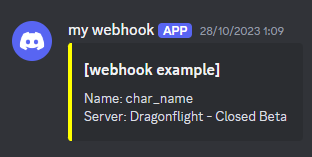
Example of how to send a message to discord through Apep:
local name = _G.UnitName("player")
local message = "Name: "..name.."\nServer: ".._G.GetRealmName()
local data = {
    embeds = {
        title = "[webhook example]",
        description = message,
        color =  0xFFFF00
    }
}
local json = _A.json:encode(data):gsub(':{', ':[{'):gsub('}}', '}]}')
local url = "https://discord.com/api/webhooks/2163585181114123568/audZXgLO88RBDOUrUiWLXqu9AHya_ZAQD0HT2cQaf0Ijs-aON2peZ6j-Ol6mURqIeC3EC"

_A.http:request("POST", url, json, function() end)
Then you can see the message in the Discord channel like this:
json.encode
- This function encodes an arbitrary Lua object / variable.
Parameters
obj(any): The Lua value (table/string/boolean/number/nil/json.null/json.empty) to be JSON-encoded.
Example:
local table = {
    ["test 1"] = {data=0, data1="xxx"},
    ["test 2"] = {data=234, data1="sdfee"}
}
local json = _A.json:encode(table)
print(json) -- (1)!
- Returns
{"test 1":{"data":0,"data1":"xxx"},"test 2":{"data":234,"data1":"sdfee"}}
json.decode
- This function decodes a JSON string and returns the decoded value as a Lua data structure / value.
Parameters
string(string): The string to scan (or "loader function" for getting next substring).position(number, optional): The position inside paramstringto start scan, default = 1.
Example:
local LuaObject = _A.json:decode('{"test 1":{"data":0,"data1":"xxx"},"test 2":{"data":234,"data1":"sdfee"}}')
print(LuaObject) -- (1)!
- table: 000005D740CC4AF1
base64.encode
- This function encodes a normal bytestring into a Base64-encoded string.
Parameters
text(string): The bytestring to encode.maxLineLength(number, optional): The maximum line length for the output. Default is 76.lineEnding(string, optional): The line ending to use. Default is "\r\n".
Example:
- Returns "SGVsbG8sIGhvdyBhcmUgeW91IGRvaW5nIHRvZGF5Pw=="
base64.decode
- This function decodes a Base64-encoded string into a bytestring.
Parameters
text(string): The Base64-encoded string to decode.
Example:
local decoded = _A.base64:decode("SGVsbG8sIGhvdyBhcmUgeW91IGRvaW5nIHRvZGF5Pw==")
print(decoded) -- (1)!
- Returns "Hello, how are you doing today?"
UnitCombatRange
- This function calculates the combat range between two units, taking into account their combat reaches.
Parameters
unit1(string): The unitId or pointer of the first unit.unit2(string): The unitId or pointer of the second unit.
Returns number
- The combat range between the two units.
Example:
md5
- This function computes the MD5 hash of the given string.
Parameters
str(string): The input string for which to calculate the MD5 hash.
Returns string
- The MD5 hash of the input string.
Example:
AutoLogin
- This function enables or disables automatic AutoLogin for the next session.
Parameters
state(boolean):trueto enable auto-login,falseto disable it.
!>Note: For this to work, you must configure your credentials in Apep.ini with:
AccountName=your_wow_account_name
AccountPassword=your_wow_password
RealmName=your_realm_name
CharName=your_character_name
Example:
toboolean
- This function converts any input to boolean if possible.
Parameters
value(any): The value to convert to boolean.
Returns boolean
- The boolean representation of the value, or
nilif conversion is not possible.
Example:
print(_A.toboolean(1))        -- true
print(_A.toboolean(0))        -- false
print(_A.toboolean("true"))   -- true
print(_A.toboolean("false"))  -- false
print(_A.toboolean(nil))      -- false
RestoreAndBringToFront
- Restores and brings the World of Warcraft window to the front.
- This function restores the game window if it is minimized and brings it to the foreground, making it visible and focused.
Example:
UnitCastDest
- This API queries the destination of a spell casted by a unit.
Parameters
unit(string): The unit identifier (e.g.,"player","target","mouseover", or a GUID).spellOrId(number or string): The spell ID or spell name.
Returns Type, guid_or_X, Y, Z
Type(string): The type of destination:"guid": The destination is a unit (returned as a GUID)."pos": The destination is a position (X, Y, Z coordinates).
guid_or_X(string or number): The unit GUID (ifType == "guid") or the X coordinate.Y(number): The Y coordinate (ifType == "pos").Z(number): The Z coordinate (ifType == "pos").
Warning
This API is only available in WotLK (Wrath of the Lich King).
Example:
local Type, x, y, z = _A.UnitCastDest("target", "Blizzard")
if Type == "pos" then
    print("Target is casting at position:", x, y, z)
elseif Type == "guid" then
    print("Target is casting on unit GUID:", x)
end
ObjectLockPointer
- This API takes a WoW object as input and returns the memory pointer of its Lock record.
Parameters
ptr(string): The WoW object to retrieve the lock pointer for (e.g.,"0x12345678").
Returns string
- The lock pointer of the specified object, or
"0x0"if invalid.
Example:
local lockPtr = _A.ObjectLockPointer("0x12345678")
if lockPtr then
    print("Lock pointer:", lockPtr)
end
ObjectLockSlots
- This API takes a WoW object as input and returns its lock record ID along with detailed slot information.
Parameters
ptr(string): The WoW object to retrieve lock slots for (e.g.,"0x12345678").
Returns ID, slots
ID(number): The lock record ID of the object, ornilif invalid.slots(table): A table of lock slots, where each slot has the following fields:type(number): The type of the lock slot.index(number): The index of the slot.skill(number): The required skill value.action(number): The action associated with the slot.
Example:
local ID, slots = _A.ObjectLockSlots("0x12345678")
if ID and slots then
    print("Lock ID:", ID)
    for i, slot in ipairs(slots) do
        print("Slot", i, "type:", slot.type, "index:", slot.index, "skill:", slot.skill, "action:", slot.action)
    end
end
Combat Log Affiliation and Spell School Utilities
The _A.CLEU_AFFILIATION table provides helper utilities to interpret combat log flags and spell school values from the COMBAT_LOG_EVENT_UNFILTERED event.
It contains:
_A.CLEU_AFFILIATION.cast→ functions to check who cast or received an event._A.CLEU_AFFILIATION.schools→ a lookup table mapping numerical spell school masks to their textual names.
These utilities simplify parsing and filtering combat log data in advanced scripts.
_A.CLEU_AFFILIATION.cast
Each function allows checking if a combat log entry originated by or was applied on a specific unit affiliation or type (e.g., player, pet, NPC, enemy, etc.).
Usage
local sourceIsMe = _A.CLEU_AFFILIATION.cast.byME(sourceFlags)
local targetIsEnemy = _A.CLEU_AFFILIATION.cast.onENEMY(destFlags)
Available Checks
| Function Name | Description |
|---|---|
byME / onME |
The player itself. |
byPARTY / onPARTY |
A member of the player's party. |
byRAID / onRAID |
A member of the player's raid group. |
byPLAYER / onPLAYER |
Any player-type unit. |
byPET / onPET |
A pet controlled by a player. |
byNPC / onNPC |
A non-player character (enemy or neutral). |
byFRIEND / onFRIEND |
A friendly unit. |
byENEMY / onENEMY |
A hostile unit. |
byME_OR_PET / onME_OR_PET |
The player or their pet. |
byFRIENDLY_OR_ME / onFRIENDLY_OR_ME |
The player or any friendly unit. |
byENEMY_OR_NPC / onENEMY_OR_NPC |
Any enemy or NPC unit. |
Returns
true→ if the flag matches the affiliation.false→ otherwise.
_A.CLEU_AFFILIATION.schools
This table maps WoW spell school bitmask values (used in combat log events) to readable school names such as "Fire", "Frost", or "Shadowflame".
Each combat log event that includes a spell school (e.g. SPELL_DAMAGE, SPELL_MISSED, etc.) provides a numeric mask, which can be resolved using this table.
Usage
local schoolName = _A.CLEU_AFFILIATION.schools[schoolMask] or "Unknown"
print("Spell:", spellName, "School:", schoolName)
Common School Values
| Mask | Name |
|---|---|
| 1 | Physical |
| 2 | Holy |
| 4 | Fire |
| 8 | Nature |
| 16 | Frost |
| 32 | Shadow |
| 64 | Arcane |
Mixed or Combined Schools (Hybrid)
| Mask | Name |
|---|---|
| 6 | Holyfire |
| 9 | Stormstrike |
| 20 | Frostfire |
| 36 | Shadowflame |
| 48 | Shadowfrost |
| 68 | Spellfire |
| 126 | Magic |
| 127 | Chaos |
These values follow Blizzard's internal bitmask system where each bit represents a separate elemental component. For example: Fire (4) + Frost (16) = Frostfire (20).
Example Usage
local cast = _A.CLEU_AFFILIATION.cast
local schools = _A.CLEU_AFFILIATION.schools

_A.Listener:Add("examples", 'COMBAT_LOG_EVENT_UNFILTERED', function(self, ...)
    local _, subEvent, _, _, sourceFlags, _, destName, destFlags, _, spellName, schoolMask = ... -- 3.3.5
    if subEvent == "SPELL_CAST_SUCCESS" then
        -- Example 1: Check if the caster is the player
        if cast.byME(sourceFlags) then
            print("The spell was cast by me.")
            print("Spell:", spellName, "School:", schools[schoolMask] or "Unknown")
        end

        -- Example 2: Check if the target is an enemy
        if cast.onENEMY(destFlags) then
            print("The target is an enemy unit.")
            print("Spell:", spellName, "School:", schools[schoolMask] or "Unknown")
        end

        -- Example 3: Combined check for player or pet
        if cast.byME_OR_PET(sourceFlags) then
            print("The spell came from me or my pet.")
            print("Spell:", spellName, "School:", schools[schoolMask] or "Unknown")
        end

        -- Example 4: Check if the caster is an enemy
        if cast.byENEMY(sourceFlags) then
            print("Enemy successfully cast a spell on", destName)
            print("Spell:", spellName, "School:", schools[schoolMask] or "Unknown")
        end
    end
end)
Auras Subscription API
The auras subscription API provides efficient access to unit auras (buffs and debuffs).
auras:all
- Retrieve all auras on a unit.
Parameters
obj(string): The unit to check for auras (e.g.,"player","target").filter(string): Optional. The caster token (e.g.,"player","target") or GUID in hex format ("0x...").
Returns table
- A list of aura tables with fields:
[1]SpellID,[2]Stack,[3]Duration,[4]EndTime,[5]Remaining,[6]CasterGUID,[7]AuraType.
Example:
local all = _A.auras:all("target")
for _, aura in ipairs(all) do
    local spellID, stacks, duration, endTime, remaining, casterGUID, auraType = unpack(aura)
    print("Spell:", spellID, "Stacks:", stacks, "Remaining:", remaining)
end
auras:id
- Retrieve specific aura(s) by Spell ID or name.
Parameters
obj(string): The unit to check (e.g.,"player","target").IdOrName(string or number): The spell ID or name to search for.filter(string): Optional. The caster token or GUID.
Returns table
- A list of matching aura entries.
Example:
local result = _A.auras:id("player", 12345)
if result and #result > 0 then
    local spellID, stacks, duration, endTime, remaining, casterGUID, auraType = unpack(result[1])
    print("Aura found:", spellID, "Remaining:", remaining)
end
auras:exists
- Check if a unit has a specific aura by Spell ID or name.
Parameters
obj(string): The unit to check (e.g.,"player","target").IdOrName(string or number): The spell ID or name to check for.
Returns boolean
trueif the aura is present,falseotherwise.
Example:
auras:buffs
- Retrieve all buffs on a unit.
Parameters
obj(string): The unit to check (e.g.,"player","target").filter(string): Optional. Caster token or GUID.
Returns table
- List of buff entries.
Example:
local buffs = _A.auras:buffs("player", "player")
for _, buff in ipairs(buffs) do
    local spellID, stacks = unpack(buff)
    print("Buff:", spellID, "Stacks:", stacks)
end
auras:debuffs
- Retrieve all debuffs on a unit.
Parameters
obj(string): The unit to check (e.g.,"player","target").filter(string): Optional. Caster token or GUID.
Returns table
- List of debuff entries.
Example:
local debuffs = _A.auras:debuffs("target")
for _, debuff in ipairs(debuffs) do
    local spellID, stacks = unpack(debuff)
    print("Debuff:", spellID, "Stacks:", stacks)
end
auras:buff
- Retrieve specific buff(s) by Spell ID or name.
Parameters
obj(string): The unit to check (e.g.,"player","target").IdOrName(string or number): The spell ID or name to search for.filter(string): Optional. Caster token or GUID.
Returns table
- A list of matching buff entries, or an empty table if not found.
Example:
local buff = _A.auras:buff("player", "Power Word: Fortitude")
if buff and #buff > 0 then
    print("Found buff:", buff[1][1])
end
auras:debuff
- Retrieve specific debuff(s) by Spell ID or name.
Parameters
obj(string): The unit to check (e.g.,"target").IdOrName(string or number): The spell ID or name to search for.filter(string): Optional. Caster token or GUID.
Returns table
- A list of matching debuff entries, or an empty table if not found.
Example:
local debuff = _A.auras:debuff("target", "Moonfire")
if debuff and #debuff > 0 then
    print("Found debuff:", debuff[1][1])
end
auras:specific
- Retrieve a specific aura from a unit that matches the spell ID or name, with optional filtering by caster or type.
Parameters
obj(string): The unit object (e.g.,"player","target", or unit GUID).IdOrName(number or string): The spell ID or spell name of the aura to search for.filter(string): Optional. The caster filter. Can be a unit token like"player","target", or a full GUID string.type(string): Optional. The aura type. Accepts"BUFF","DEBUFF","HELPFUL", or"HARMFUL".
Returns auraId, stackCount, duration, endTime, remaining, casterGuid, auraType
auraId(number): The spell ID of the matched aura.stackCount(number): The number of stacks.duration(number): The duration of the aura in seconds.endTime(number): The server timestamp when the aura will expire.remaining(number): Time remaining in seconds.casterGuid(string): The GUID of the aura's caster.auraType(string):"BUFF"or"DEBUFF".
!>Note: The most relevant aura is determined as the one with the latest EndTime.
Example:
local id, stacks, duration, endTime, remaining, caster, type = _A.auras:specific("target", "Moonfire", "player", "DEBUFF")
if id then
    print("Moonfire on target:", id, "Remaining:", remaining)
end
Global Variables and Options
_A.FaceAlways
- This global variable controls whether Apep automatically faces the target when casting spells.
Type
boolean
Usage
- Set to
trueto enable automatic facing for all casts from Apep. - Set to
falseto disable automatic facing (default behavior).
Example:
local exeOnLoad = function()
    _A.FaceAlways = true
end

local exeOnUnload = function()
    _A.FaceAlways = false
end
FaceCast (Lua Mode)
- In Lua mode, you can use the
FaceCastmethod to selectively cast spells with automatic facing.
!>Note: This method is only available in Lua Mode and requires _A.FaceAlways to be set to false for selective control.